

Purpose of Learning Path
Path is TUMO’s internal system that automatically generates personalized learning paths for students based on their selected skills, progress history, and the real-world scheduling of events (workshops and labs). It’s designed to offer each student a unique, dynamically updated roadmap through TUMO’s educational content.
Upon entering TUMO World, each student selects 4 skills (configurable) using the Selection Wheel. Based on this selection, the system generates an initial learning path, which can dynamically adapt whenever the student logs in, refreshes their page, or makes progress.
Path Layout Interface: Columns, Rows, and Visual Rules
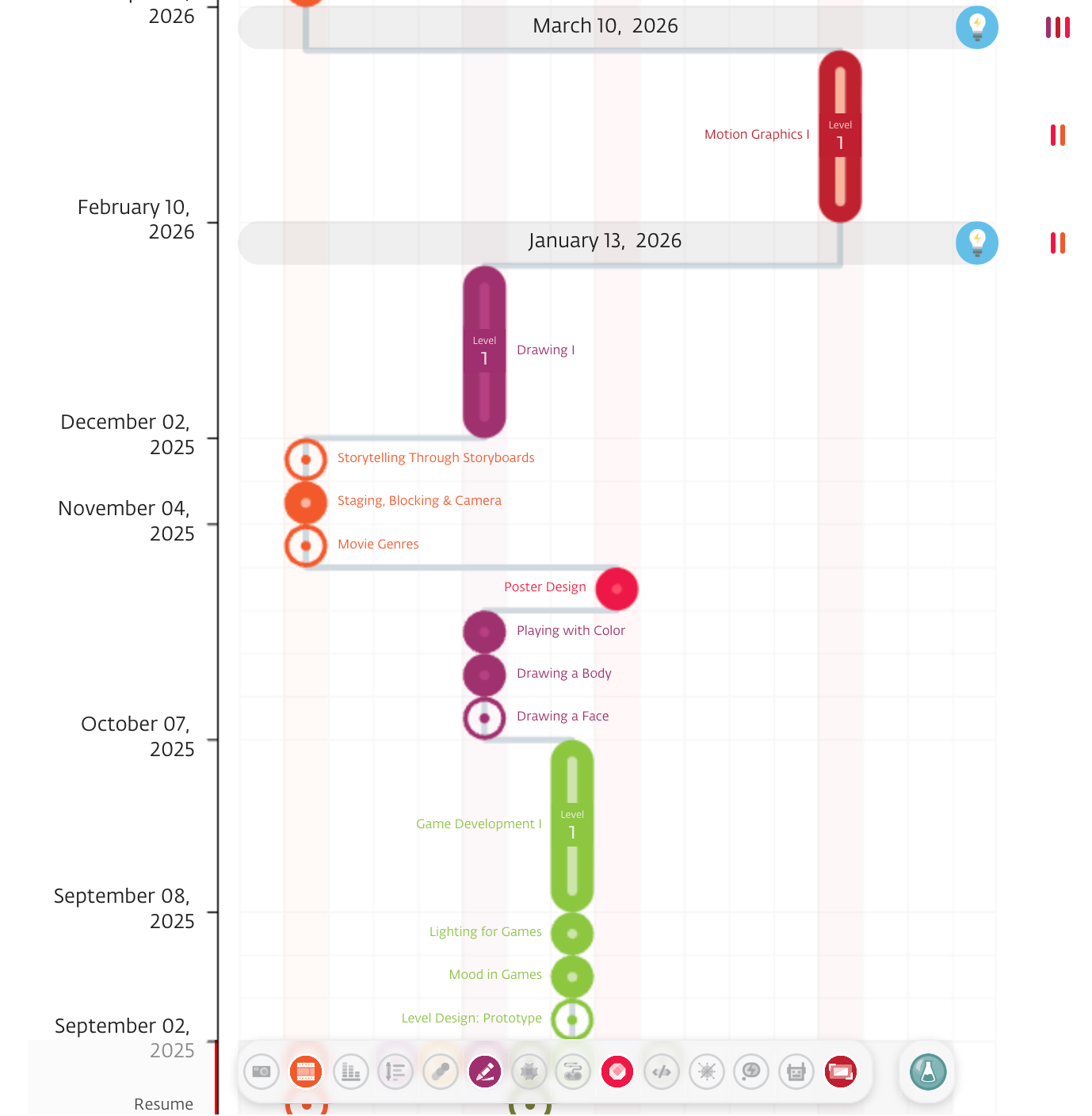
In the Path view, each column represents a single skill, and each row corresponds to an Event Group (the timeline moves vertically by groups). There is also a dedicated “Learning Labs” column to the right of the skill columns; all labs are visualized in that column.
The visual grammar is simple: long capsules show workshops, and circles show self-learning activities.
For permanent workshops, a student can have only one workshop per Event Group row. In addition, a workshop’s start and end dates must be fully contained within the row’s Event Group window. It cannot start before the group begins or end after the group finishes.
Learning Labs do not follow those constraints. Multiple labs can appear in the same row, and their timing may overlap Event Group boundaries. Labs are placed on the timeline according to their actual dates in the Labs column and do not consume the “one workshop per group” slot.
Path Generation Algorithm
This section explains how the system builds and evaluates learning paths step by step.
Filter Workshops
The first step in generating a path is to identify which workshops are eligible - meaning the student could potentially be subscribed to them. This eligibility check is based on the following conditions:
The workshop’s skill matches the student’s selection.
The student has not already completed it.
All prerequisites are met or can be scheduled before the workshop starts.
The event has available capacity.
The workshop’s schedule matches the student’s schedule (event schedule template).
The first lesson of the event has not already finished.
The student has not been manually unsubscribed from the event before.
Only workshops that pass all these checks are included in the pool of path options used to build the learning path.
Eligible workshops are then combined with their prerequisite activities to assemble possible paths.
Prerequisite Self-Learning activities logic
After identifying eligible workshops, the system also considers prerequisite self-learning activities required to attend those workshops.
Each path is built not only from events, but also from the necessary preparatory self-learning activities. These are placed according to the following logic:
As close to today as possible: The system schedules prerequisite self-learning activities near the current date to give students the maximum amount of time to complete them.
Dependency chain -aware ordering: The system respects chains of dependencies ( full sequence of required events and activities), ensuring no step is scheduled before its prerequisites are placed.
If a self-learning activity depends on the completion of a prior workshop, it will only be placed after that workshop has occurred.
Minimum Gap Between Workshops (Config)
Before the system creates possible paths it applies a spacing rule between workshops. This configuration defines the minimum number of days required between the end date of one workshop and the start date of the next in the student’s path.
For example, if the configuration is set to 28 days, the system will only place the next workshop in the path if there are at least 28 days between the previous workshop’s finish and the upcoming workshop’s start.
The purpose of this rule is:
Balance - Ensures students have time for self-learning between workshops, keeping the learning rhythm sustainable.
Fairness - Prevents a single student from taking multiple consecutive workshops in rapid succession while others have no workshop opportunities.
Construct Possible Paths
Once the system has the filtered list of eligible workshops and self-learning activities, it begins creating possible learning paths.
First, it organizes all filtered workshops by event group (also called an event circle). A student can participate in only one permanent workshop per event group.
From this structure, the system constructs possible paths, each one is a sequence of consecutive workshops and the required self-learning activities, spread across event groups.
Because different workshops can be placed in different orders while still meeting prerequisites, there can be multiple possible path scenarios. These variations come from:
Different combinations of workshops in different event groups.
Different sequencing that still satisfies prerequisites and scheduling constraints.
Each possible path represents a complete journey through the student’s chosen skills within the defined planning horizon. The system then compares these options and selects the best fit based on the Best Path Principles.”
Searching for the Best Path → How the system evaluates and selects the best path
Best Path Principles (Best Path Logic)
After building all path options, the system uses these principles to decide which should be chosen as the student’s path. After generating several possible paths, the system applies the Best Path Principles to choose one. Paths that align better with these principles are preferred.
Core Priorities
- More Workshops = Higher Value - The more workshops a path contains, the more opportunities the student has to engage with hands-on learning.
- Earlier Workshops Are Better - The sooner workshops start in the path, the higher the path scores. Earlier engagement is considered more valuable for motivation and continuity.
- Prefer Higher-Level Workshops - Paths that include later levels in a sequence (e.g., Animation 3 in an Animation 1 → Animation 2 → Animation 3 chain) have higher score.
- Keep Same-Skill Workshops Close Together - Paths where workshops from the same skill are scheduled close together are preferred. This avoids long gaps that could break knowledge retention.
- Prioritize Top-Selected Skills (configurable) - If enabled, the system gives higher priority to workshops from skills chosen earlier in the student’s Selection Wheel.
Bad Path Logic
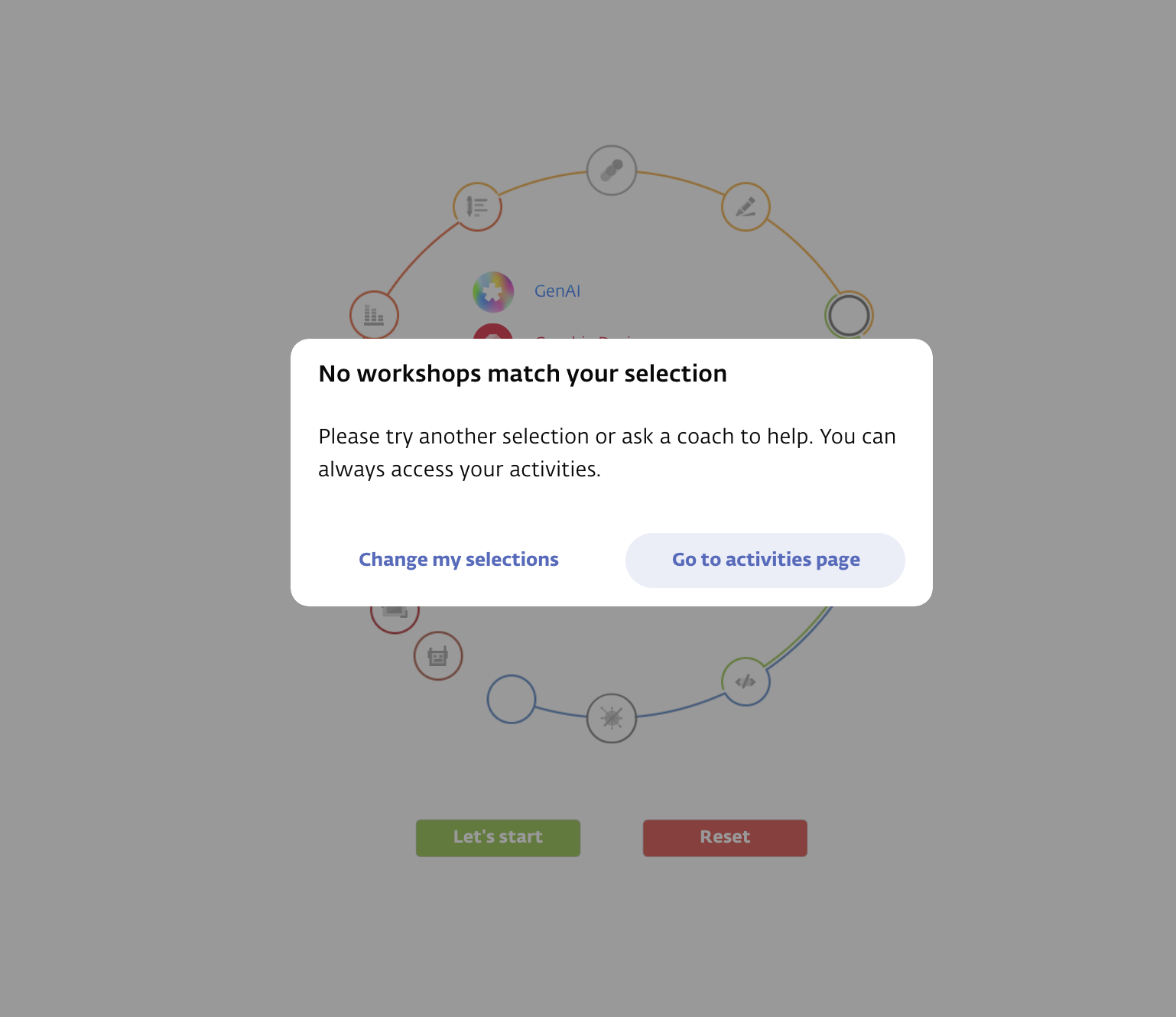
Path 1.0 includes a safeguard known as the Bad Path check. Each center defines a configuration value for the maximum allowed number of consecutive months a student can remain in self-learning mode without attending a workshop.
When the system generates a path, it checks this limit. If the planned sequence contains more self-learning than allowed, it warns the student before confirming the new path.
The message shown is:
Header: “You may need to wait longer for a workshop”
Body: “Due to the workshop's schedule and available space, you may have to wait longer for a workshop if you keep these current choices.”
Student option: “Continue anyway”
The purpose of this logic is to avoid situations where a student is stuck in a long stretch of self-learning with no workshops on the horizon. Instead of silently allowing this, the system gives the student a choice:
Continue anyway — keep the current plan despite the gap.
Accept an updated path — switch to a version that reduces the self-learning gap and schedules a workshop sooner.
This ensures students are aware of long workshop delays and can make an informed decision before committing to their path.
Alternative Workshop Options (Manual Overrides)
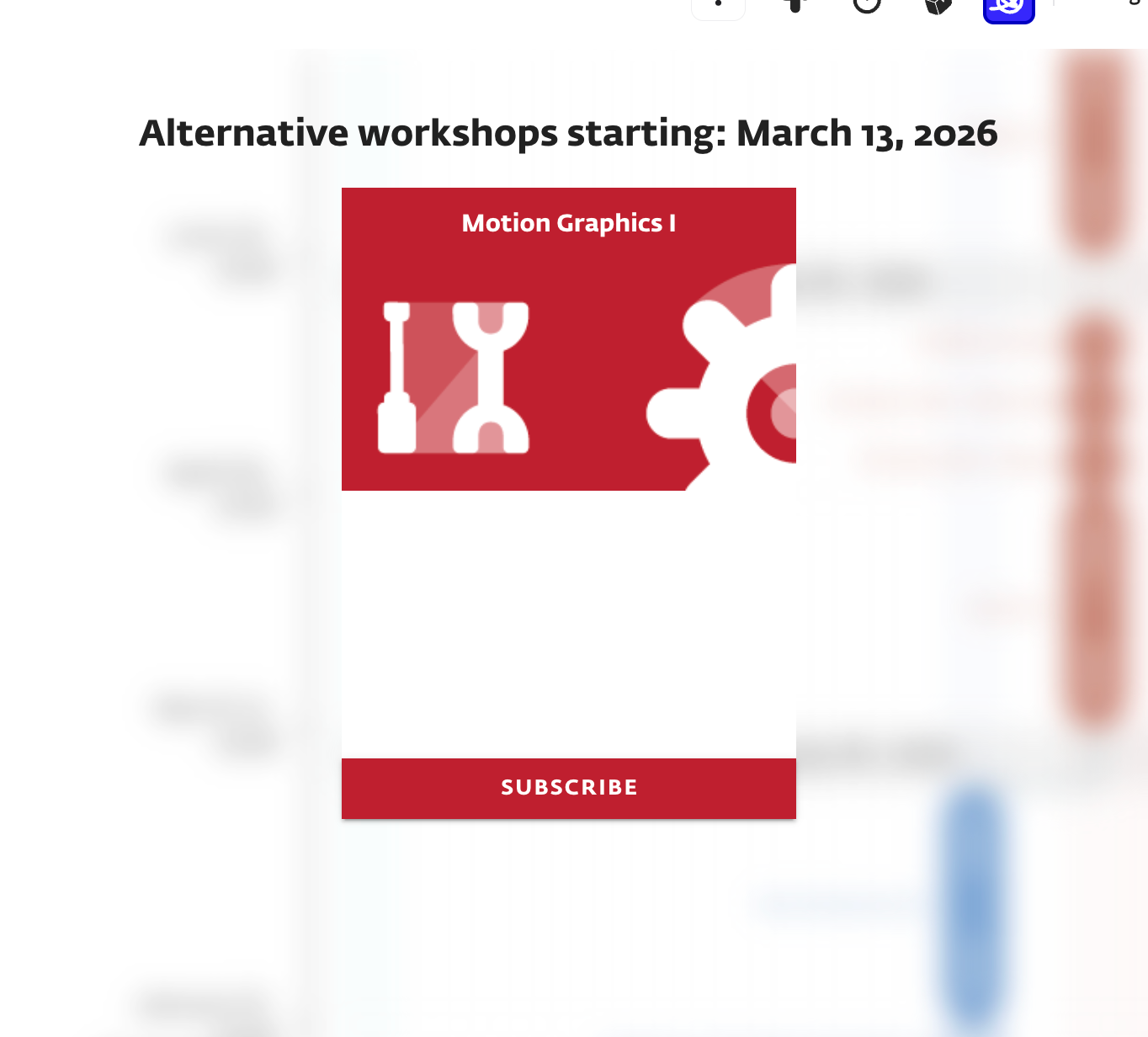
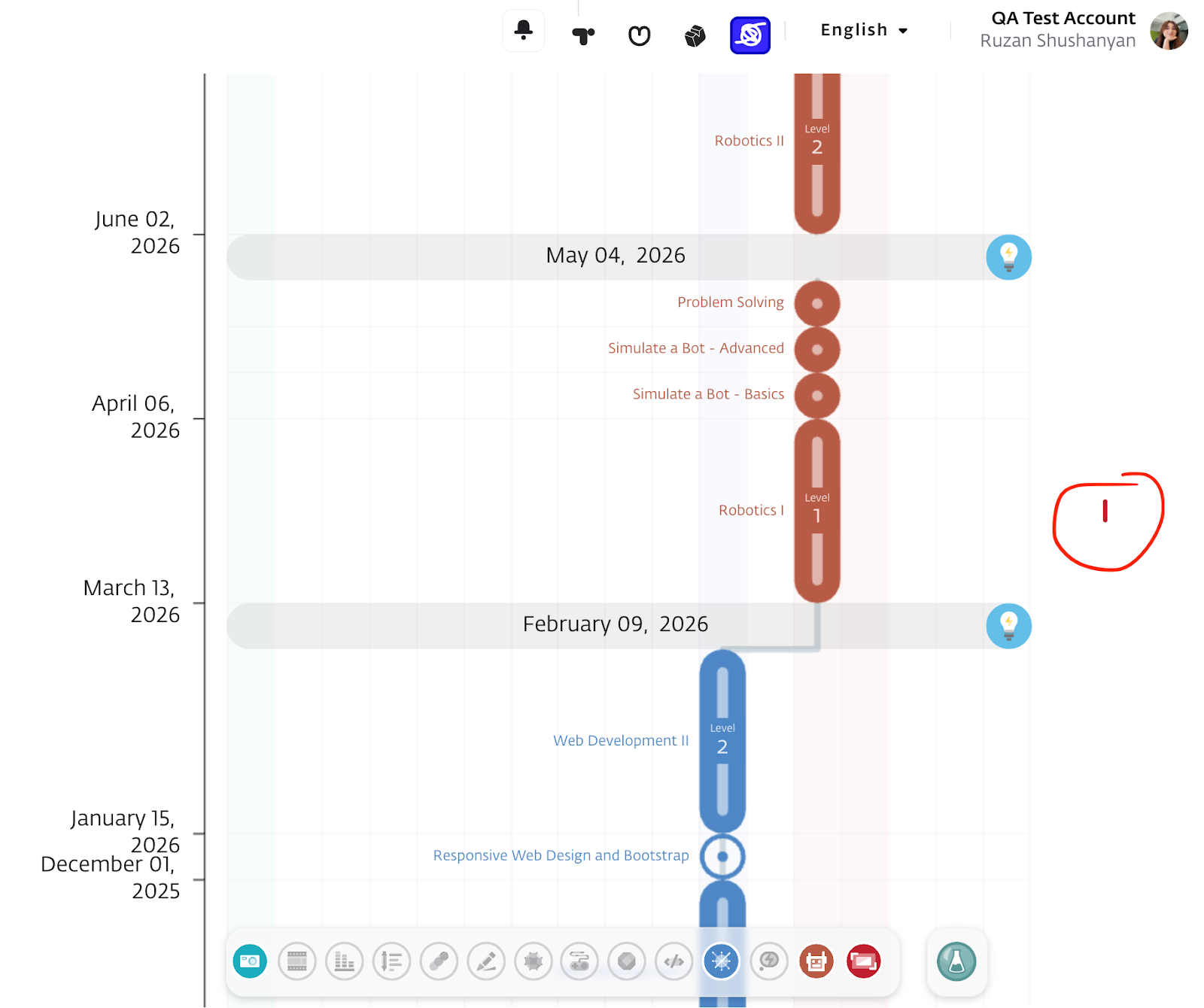
After the system selects and displays the best path for the student, it still offers flexibility through alternative options.
For each event group (event circle), the system shows small icons on the right side of the path representing other eligible workshops that were not included in the selected path (since only one workshop per circle can be chosen).
If the student prefers one of these alternatives:
They can manually subscribe to it by clicking the icon.
Once subscribed, the system automatically regenerates the path, incorporating the newly selected workshop.
This triggers a fresh round of path generation with the alternative workshop as a fixed input.
Important Note:
Only alternative workshops that meet core scoring priorities and do not conflict with existing manually subscribed workshops will be shown.
After the student selects an alternative workshop and the path is regenerated, the system marks that workshop as "Preferred".
In future recalculations, alternative options that conflict with the preferred workshop (e.g., overlapping schedules or prerequisite conflicts) will be excluded.
This explains why, after choosing one alternative (e.g., “Animation 1” in October), other previously visible alternatives may no longer appear - they now conflict with the student’s preferred path.Only alternatives that provide the strongest advancement in the student’s selected skills are shown. If several options are available, the system prefers those that progress the learner to more advanced workshops in their chosen skills. If multiple alternatives exist, the one that progresses the learner further in a chosen skill is shown first; options that don’t match that level of advancement are hidden.
This mechanism allows students to:
Customize their learning journey while staying within system rules
Explore alternative workshops if the suggested one doesn't match their preferences or timing
Dynamic Adaptation of Path
The system doesn’t just build a learning path once and forget about it. Every time a student logs in or refreshes their page, it checks whether the current path still makes sense and runs the Best Path Search algorithm to see if a better path is available.
There are several reasons why a path may change:
Self-Learning Feasibility
Each self-learning activity has an expected duration, defined by content creators. The system also knows how much self-learning time a student has (based on their weekly schedule).
It constantly checks:
“Can this student realistically finish all prerequisite self-learning before the workshop begins?”
If the answer is no, the system may adjust the path.Workshop Status Updates
If a workshop’s status changes - for example, it becomes Completed, Incomplete, or Withdrawn - the system re-evaluates the path to reflect the new learning state when students login or refresh the path.Newly Available Capacity
If an eligible workshop (previously full) now has space or if a new workshop is scheduled the system may consider it for inclusion in the path.Skill Selection Change
When a student updates their selected skills, the system re-evaluates and rebuilds their path accordingly.Schedule Change
Updates to the student’s availability can cause conflicts with existing workshops, triggering a path refresh.Manual Subscription by Staff
A staff member manually subscribes the student to a workshop, which may affect other workshops or prerequisite placements in the path.
How the System Reacts to Change
Depending on the situation, the system may either force a change or suggest a better path.
Forced Removal (Worse Change)
If a workshop must be removed from the path (e.g., self-learning can't be completed in time, or a schedule conflict arises), the system unsubscribes the student and regenerates the path.
This happens:
Immediately, when the student logs in or refreshes their page
Or overnight, during a scheduled job called the Unsubscribe Cron
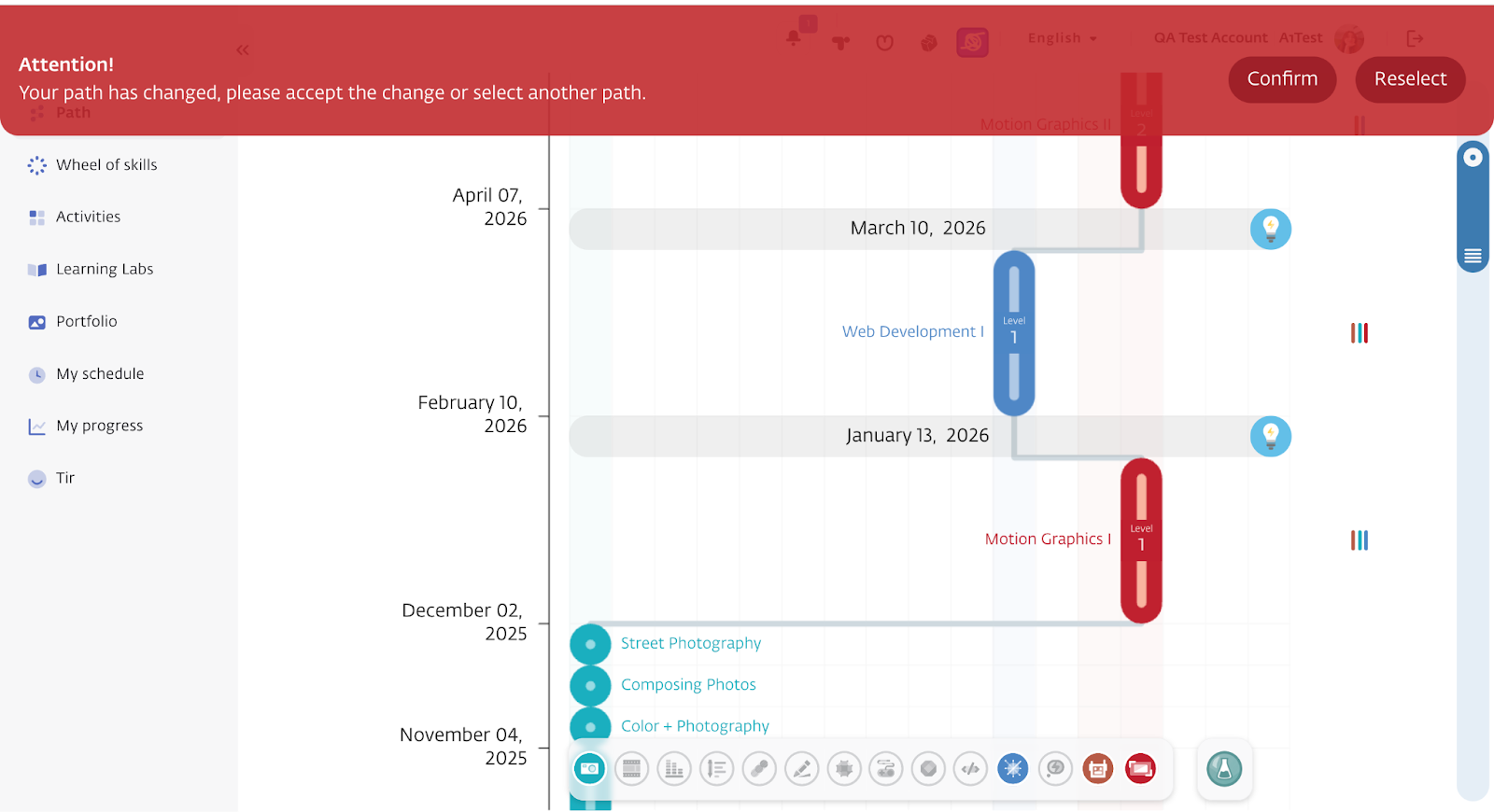
The student will see a red notification: “Your path has changed.”
A new updated path will then be displayed.
Suggested Upgrade (Better Change)
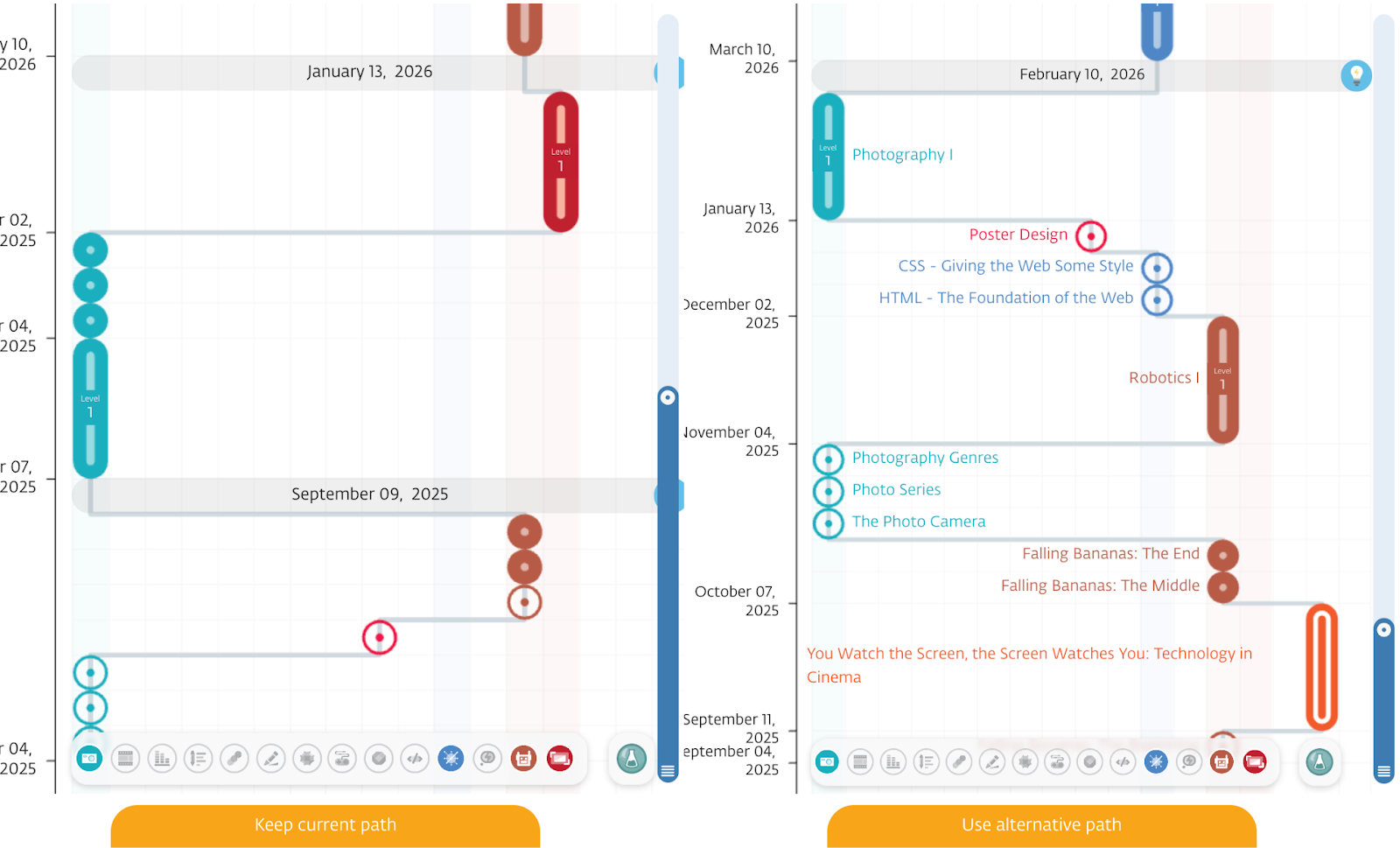
If a better version of the path becomes available (for example, a seat opens in a suitable workshop), the system automatically enrolls the student in that workshop and suggests an improved path.
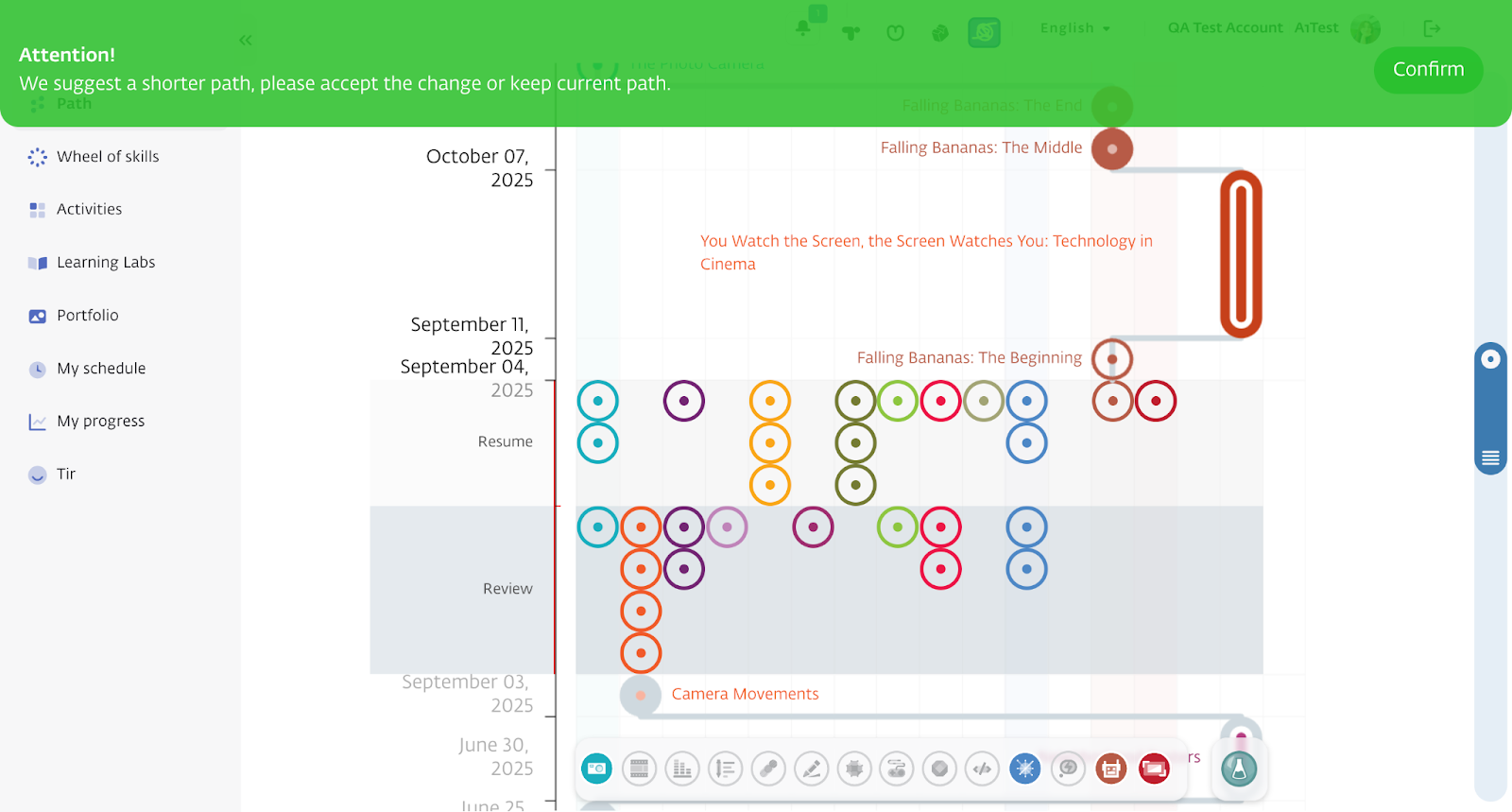
The system considers the new path better and suggests it only if it
(a) advances the student further in their chosen skills without delaying the next workshop, or
(b) keeps the same level of advancement while starting the next workshop earlier.
The student will see a green notification: “You have a better path!”
They can preview this version and choose whether to switch to it or keep the current path։
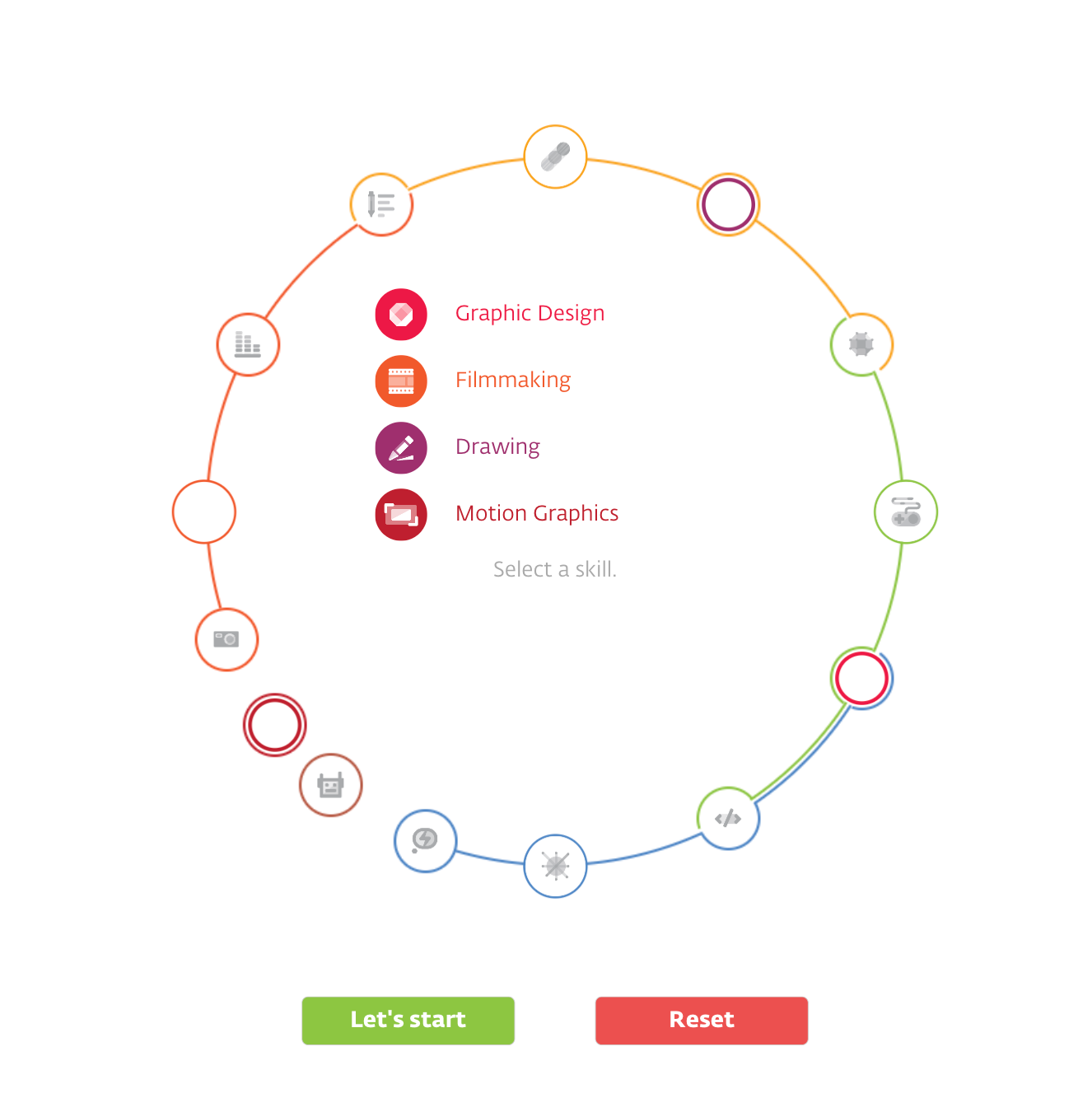
Forced Skill Reselection When No Path Exists
If the Student’s current path is not available anymore (e.g., due to lack of eligible workshops, unmet prerequisites, or scheduling conflicts), based on the student's current skill selection and the system is unable to generate any valid learning path, it will: Redirect the student to the Skill Selection Wheel, so student can choose a new set of skills.
Learning Labs in Path
Learning Labs are a distinct event type separate from permanent workshops. They are not recurring; each lab has unique content, its own schedule, and a specific duration.
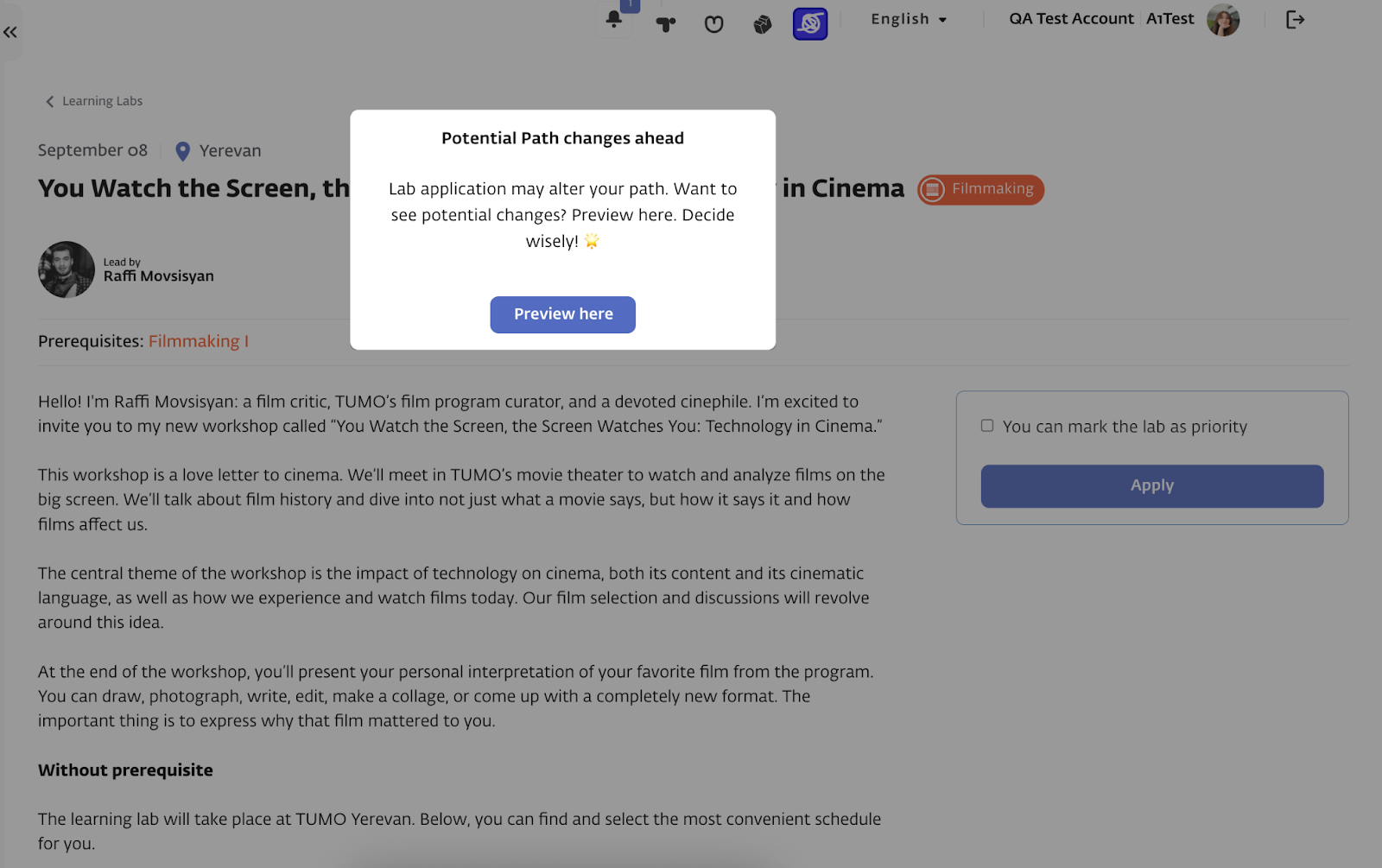
Admins create Learning Labs in T360 and publish announcements that appear on the TUMO World “Learning Labs” page. Students browse these announcements and apply themselves. Applications can be approved or rejected manually by admins, or (if enabled) an automated cron can approve/reject based on student and center-level priorities.
When a student applies, the system warns that accepting the lab may change their path and asks for confirmation. If the student proceeds, the path is not changed immediately; it updates only after the application is approved and the student is officially subscribed to the lab.
Upon approval, the path engine recalculates the student’s path to place the lab appropriately. If the lab conflicts with existing workshops, schedules, or prerequisite chains, the engine reruns the path algorithm and attempts to build a new path with the lab treated as a fixed commitment. If the conflicts cannot be resolved within system rules, the application may be rejected.
Once a Learning Lab is part of the path, it is treated as a high-priority commitment during future recalculations (see “Manual & Learning Lab Preservation”), ensuring it is retained unless a staff action or rule requires removal.